REVIEW · HONG KONG
Hong Kong and Macau Pocket Wi-Fi with Unlimited Data
Book on GetYourGuide →Operated by Hong Kong ULink Service Company Limited · Bookable on GetYourGuide
No roaming. Just a pocket router.
This Hong Kong and Macau pocket Wi‑Fi is interesting because you can grab it right at Hong Kong International Airport and use unlimited 4G across both places without messing with local SIMs. I like that it’s built for real trip use: maps, online searching, and social apps that you actually depend on day to day.
My favorite part is the practical setup. The airport pickup and return makes it easy to start and end your trip, and you can share the connection with friends and family. One device supports up to 5 connected devices (phones, computers, and tablets), so you’re not stuck taking turns checking directions. The one consideration: there’s a 500HKD deposit that has to be handled at pickup and returned only after the device is back.
In This Review
- Quick Take: What This Pocket Wi‑Fi Really Helps With
- Picking It Up at Hong Kong International Airport (And Getting Started Fast)
- Using Unlimited 4G in Hong Kong and Macau Without Data Anxiety
- Sharing Data With Up to 5 Devices (Why Group Trips Win)
- What Happens Day to Day: The “Connected” Itinerary Mode
- Stage 1: Day one setup (after pickup)
- Stage 2: Sightseeing days (constant use)
- Stage 3: Keeping everyone online
- Stage 4: Last-day energy
- Returning the Wi‑Fi and Protecting Your 500HKD Deposit
- Price and Value: Why $23 Can Be Worth It (Or Not)
- Who This Pocket Wi‑Fi Rental Fits Best
- Should You Book This Pocket Wi‑Fi? My Recommendation
- FAQ
- How much does Hong Kong and Macau Pocket Wi‑Fi cost?
- How long is the pocket Wi‑Fi valid for?
- Where do I pick up the device?
- Can I use the pocket Wi‑Fi in both Hong Kong and Macau?
- How many devices can connect to one pocket Wi‑Fi?
- Is it really unlimited data?
- Is there a deposit?
- What if I need to return the device late at night?
- What’s included with the rental?
- Can I cancel for a refund?
Quick Take: What This Pocket Wi‑Fi Really Helps With
If your travel style is part planning, part improvising, pocket Wi‑Fi can be a big relief. Hong Kong and Macau are easy to get around, but you still want live maps, transit info, and quick lookups when you’re deciding what to do next.
This option is most useful for groups. With one hotspot you can keep multiple people connected, so you don’t end up with one phone draining data while everyone else waits. That matters on sightseeing days when you’re hopping neighborhoods and constantly changing plans.
Picking It Up at Hong Kong International Airport (And Getting Started Fast)
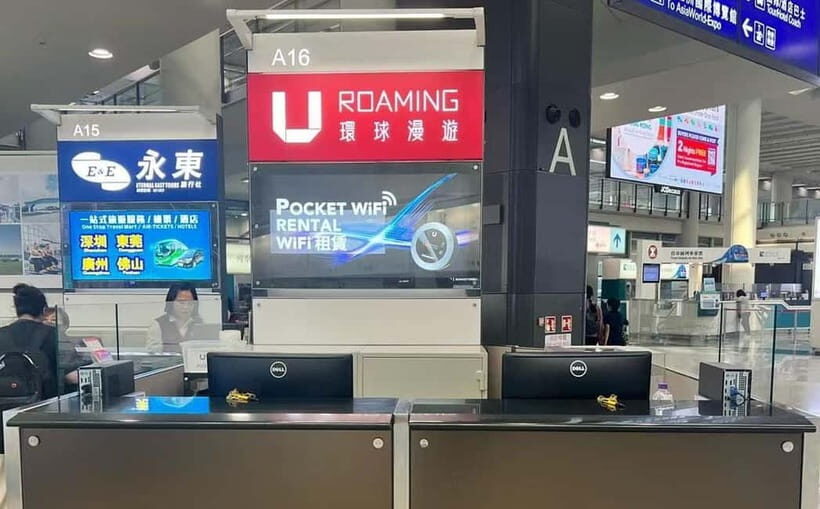
You pick up the device at Hong Kong International Airport, and you return it at the same spot when you’re done. That simple pattern is the whole point: no hunting for a shop, no waiting for mail, and no guessing whether your SIM will work in the next city.
Think of this like traveling with a key you can use immediately after landing. Once you have the device in hand, you can get your accounts working again, open maps, and check transport options right away. For jet-lagged arrivals, that alone can save time and stress.
One more detail to keep in mind: the meeting point can vary by the option you book. You’ll want to double-check where the return desk is before you leave your arrival area, especially if you have tight connections or you’re traveling with someone who needs you on a schedule.
You can also read our reviews of more tours and experiences in Hong Kong.



Using Unlimited 4G in Hong Kong and Macau Without Data Anxiety
The promise here is 4G access with unlimited data while you’re in Hong Kong and Macau. In plain terms, that’s what you want if you plan to use:
- online maps and route searches
- social media and messaging
- web browsing for attractions, opening hours, and quick questions
Even with unlimited plans, the real question is whether you’ll feel slowed down. The service states that you’ll have an uninterrupted connection without any reduction in internet speed. I can’t guarantee your exact experience in every pocket, but the intent is clear: this is meant to keep you from constantly switching into low-data behaviors.
Also, you’re not just covering one city. You’re covering two destinations with one device, which is great if your itinerary crosses the border or you’re bouncing between Hong Kong and Macau over several days.
Sharing Data With Up to 5 Devices (Why Group Trips Win)
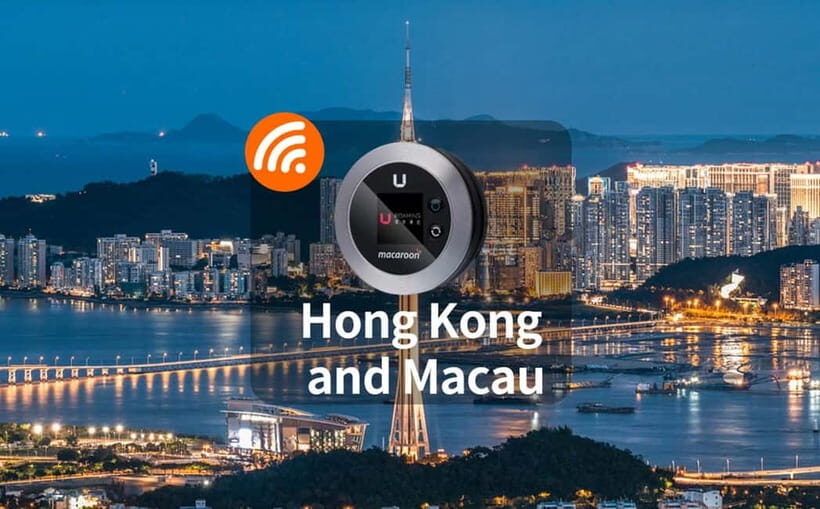
This pocket Wi‑Fi supports up to 5 connected devices at the same time. That includes phones, computers, and tablets, which is handy if you’re traveling with mixed device types: one person’s navigating on a laptop while others use phones for photos and messaging.
Here’s the practical benefit: it reduces the usual group friction of split data plans. Instead of one person running everything, everyone can check routes, verify plans, and share updates in real time.
If you’re traveling as a family or a small friend group, this is where value shows up. You’re essentially buying peace of mind for multiple devices rather than just for one.
What Happens Day to Day: The “Connected” Itinerary Mode
This isn’t a guided tour with scheduled stops. What you get is a tool that changes how the days feel. Instead of planning every move offline, you can make choices while you’re already out walking.
Stage 1: Day one setup (after pickup)
Once the device is in your hands at the airport, your trip shifts into connected mode fast. You can confirm directions, look up the next stop, and avoid that awkward moment of standing on the sidewalk with half a map and no signal.



Stage 2: Sightseeing days (constant use)
Hong Kong and Macau reward flexibility. You might start with one plan, then adjust after you see a street, a neighborhood vibe, or a viewpoint. With pocket Wi‑Fi, your phone becomes a real planning device again, not just a camera.
You’ll also be better at handling timing changes. If your day runs longer than expected, you can quickly check routes and transit options instead of guessing.
Stage 3: Keeping everyone online
Because you can connect multiple devices, it’s easier to coordinate. You can share links for food spots, confirm where everyone is meeting, and keep your group from scattering without a plan.
Stage 4: Last-day energy
On your final day, you’re still connected until you return the device. That matters because departures can throw curveballs: you might be checking transport, looking up the best route to the airport returns desk, or re-confirming timing.
Returning the Wi‑Fi and Protecting Your 500HKD Deposit
Here’s the part to treat seriously: the 500HKD deposit. It’s arranged at pickup, and it’s returned to your account within 14 working days after you return the device.
That return timeline is important. If your trip ends and you expect the deposit to vanish from your life immediately, plan for a little waiting.
Return timing also matters. If you arrive at the airport returns desk after 11:00 PM, there’s a drop box option available. You need to return the device in the 11:00 PM–6:00 AM window.
And here’s the real-world caution: if you’re trying to make a return from a side of the airport that turns out to be hard to reach from your route, you can run into trouble. There was at least one unfortunate situation where someone used a different arrival method to reach the airport but couldn’t get to the terminal they were supposed to. When that happens, the consequence was losing the deposit because the device wasn’t returned as required. The takeaway for you: build your return plan around reaching the airport return desk smoothly.
If you’re unsure how your departure route lines up, give yourself buffer time. Extra time costs less than a deposit.
Price and Value: Why $23 Can Be Worth It (Or Not)
The price listed is $23 per person for 3–10 days in Hong Kong. For value, the key isn’t just the total cost. It’s how many people and devices you need to keep connected without paying roaming fees.
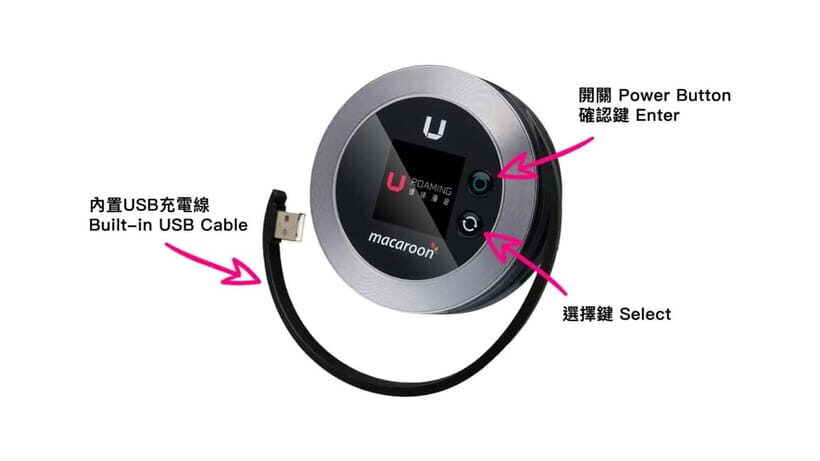
This rental also includes the essentials: the pocket Wi‑Fi device, a USB cable, and an adapter. That means you’re not scrambling to buy accessories right before the trip.
Now, the tricky part: how you choose quantities. You’re told to pick the number of pocket Wi‑Fi devices you need as your participant number. For example, if you want 2 pocket Wi‑Fi devices for a 3-day trip, you book for 2 persons under the 3 Day option. That’s a useful rule because it prevents the common mistake of under-ordering when you actually need more than one device for your group.
So when does this feel like a smart buy?
- You’re traveling with 2–5 people who want to be online at the same time.
- You want to avoid fiddly SIM purchases at each stop.
- You value not worrying about who has working data for maps and messaging.
When might you consider alternatives?
- If you’re traveling solo and you already know you’ll use a cheaper SIM setup.
- If your plan includes a departure pattern that makes airport returns complicated, because a missed or delayed return can be costly.
Who This Pocket Wi‑Fi Rental Fits Best
This is a strong match if you:
- travel with a group and want everyone to stay connected
- rely on maps for navigation and transit
- want to avoid roaming charges and keep data usage predictable
- plan to spend a few days bouncing between Hong Kong and Macau
It’s also handy for business travel because you can keep multiple devices online, not just one phone.
If you prefer minimal gear and you rarely need data on the go, it may feel like extra. But for most people using a phone as a map and a planner, pocket Wi‑Fi is the easiest “always on” solution.
Should You Book This Pocket Wi‑Fi? My Recommendation
I’d book it if your priority is simple connectivity from the moment you land. The airport pickup/return rhythm is the reason this works, and the up-to-5-device sharing is what makes it fair for groups.
I’d also book with one mindset: protect the return. The 500HKD deposit and the drop-box timing mean you should plan your last day so you can get the device back on time. If you’re the type who hates surprises at the airport, give yourself extra margin before your return and double-check the return desk location for your chosen option.
If you do that, this service is a practical, no-drama way to keep your trip running on data.
FAQ
How much does Hong Kong and Macau Pocket Wi‑Fi cost?
It’s listed at $23 per person.
How long is the pocket Wi‑Fi valid for?
The rental is valid for 3 to 10 days.
Where do I pick up the device?
You pick it up at Hong Kong International Airport.
Can I use the pocket Wi‑Fi in both Hong Kong and Macau?
Yes. It provides 4G connection in Hong Kong and Macau.
How many devices can connect to one pocket Wi‑Fi?
Up to 5 devices can connect at the same time, including phones, computers, and tablets.
Is it really unlimited data?
The service is described as unlimited data with 4G access.
Is there a deposit?
Yes, there is a 500HKD deposit arranged at pickup. The deposit is returned to your account within 14 working days after the device is returned.
What if I need to return the device late at night?
If you reach the airport returns desk after 11:00 PM, a drop box service is available. Return the device within 11:00 PM–6:00 AM.
What’s included with the rental?
You receive the pocket Wi‑Fi device, plus a USB cable and adapter.
Can I cancel for a refund?
Yes. You can cancel up to 24 hours in advance for a full refund.